
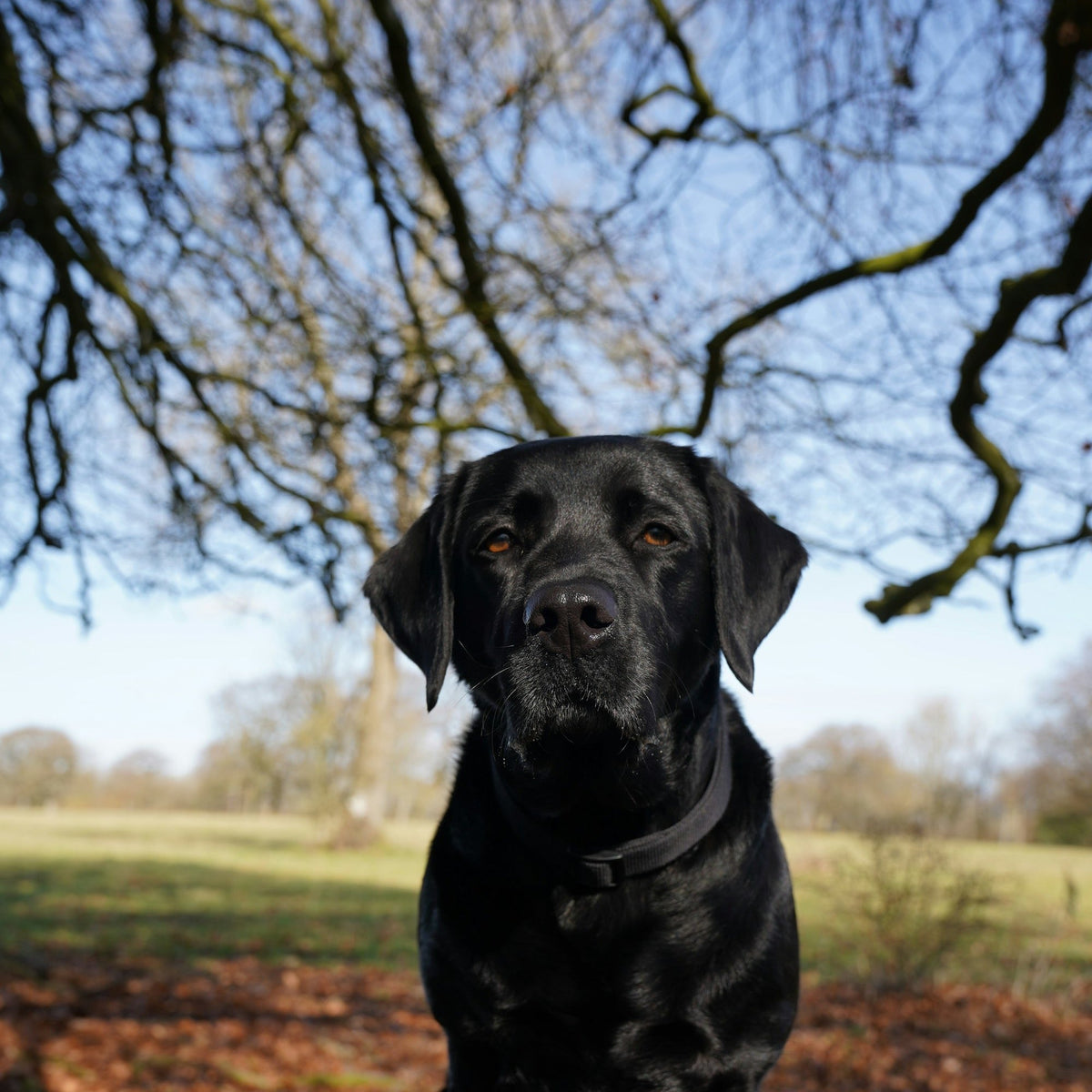
If you've ever tried to take a picture of a black dog, you know the result: a dark shape with two shiny eyes, or a nice-looking dog against a sky that's turned completely white. Learning how to photograph a black dog doesn't take a better camera. Your phone is trying to be helpful, and with black fur, "helpful" goes wrong in a predictable way. Once you know what it's doing, you can fix it in a few taps.
Everything below works on an iPhone or an Android phone. If you want the general basics first (getting your dog to sit, burst mode, angles), our guide on how to take pictures of your dog covers them. This one is just about dark coats.
How to photograph a black dog: the short version
- Use soft light. Open shade, an overcast day or a big window. Flash off.
- Turn your dog toward the light. Light on the face, not behind it.
- Tap on the face, then raise brightness. Stop when you can see fur, not just a shape.
- Look for the catchlight. A small bright spot in each eye means the light is in the right place.
- Pick a middle-tone background. Grass, a wood floor, a gray couch. Not black, not glaring white.
- Zoom in to check. If you can see texture on the forehead, you've got it.
Why black dogs are hard to photograph
Your phone measures the light in a scene and tries to make the whole picture land somewhere in the middle: not too dark, not too bright. That works for a tan dog on a beige rug. A black dog throws off the math in one of three ways.
| What happens | Why | The fix |
|---|---|---|
| Your dog comes out as a flat black blob | The phone set brightness for a bright background, so the darkest thing in the frame drops to pure black | Tap on your dog's face so the phone measures there, then raise brightness |
| The background turns white and washed out | The phone brightened everything to make all that black fur look average | Move so the background is a middle tone, like grass, trees or a shaded wall, instead of open sky or a sunny white wall |
| The fur looks gray and muddy | Too much brightening in a dim room, or a heavy edit afterward | Get more light on your dog before you shoot instead of fixing it later |
Most black dog photos aren't ruined by the dog. They're ruined by the light, and by where the phone decided to look.
Light: soft, from the front, and plenty of it
Black fur soaks up light. The more soft light you give it, the more detail you get back.
- Open shade outside. On a sunny day, step into the shadow of a building or a big tree, with your dog facing out toward the bright open sky. Lots of light, no harsh shadows. This is the single easiest setup for a black dog.
- Overcast days. Clouds spread the light evenly, so a black coat looks rich instead of shiny and patchy.
- A big window indoors. Bring your dog close to the glass, facing it or at a slight angle. A black dog needs to be closer to the window than you'd think.
- Golden hour. Low, warm light in the hour after sunrise or before sunset brings out hints of brown or red that many black coats hide under a lamp. Just take at least one photo in open shade too. Warm light can make a black coat look browner than it really is.
Two things to skip. Direct midday sun turns black fur into a mirror: white glare on top, deep shadow underneath. Flash flattens the coat and makes the eyes glow green or yellow. If you're stuck indoors in the evening, turn on every lamp in the room and bring your dog close to the brightest one.
The eyes: look for the catchlight
With a black dog, the eyes are where people look first, and they're also the easiest thing to lose. Dark eyes in a dark face can disappear completely.
The fix is a catchlight: the small bright reflection of a window or the sky in each eye. Before you take the photo, look at the screen. If you can see that little spot of light, your dog is facing the light and the eyes will read. If you can't, turn your dog (or yourself) until it shows up.
Then tap on the eye closest to you, and press and hold to lock it. With a black dog this matters more than usual: without the lock, the brightness jumps around every time your dog shifts in front of something bright.
How to photograph a black dog with an iPhone
An iPhone gives you everything you need. Here's the order that works:
- Tap your dog's face, then drag the little sun icon up until you can see fur on the forehead.
- Press and hold on the eye until "AE/AF Lock" appears, so the setting stays put.
- For a whole session, open the camera controls (tap the arrow at the top of the screen, or swipe up above the shutter) and use the ± exposure control to keep every shot a little brighter.
- Turn Night mode off if your dog won't sit still. In dim light it keeps the shutter open longer, and moving black fur turns into a smear. Tap the moon icon to switch it off, then add more light instead.
- Shoot a burst. Slide the shutter button to the left and hold, then pick the frame where the eyes are sharpest.
On Android, tap and drag works much the same way, and many phones have a Pro or Manual mode where the EV setting does the job of the ± control.
If your phone has an HDR setting, leave it on; newer iPhones do this automatically. It blends a few exposures together and usually helps when black fur sits next to a bright background.
Backgrounds that help a black coat stand out
You want your dog's outline to be easy to trace. A background that's a little lighter than your dog is perfect. A bright background is fine. A glaring white one isn't, because the phone darkens everything to cope.
- Good: green grass, autumn leaves, a light wood floor, a gray or tan couch, a pale wall in soft light.
- Harder: a black leather couch or dark bedding (your dog turns into a very cute shadow), or snow and white walls in full sun.
- Small helper: a colorful collar or bandana gives the eye somewhere to land and shows where the head ends and the neck begins.
Angles: get low, and turn them a little
Get down to your dog's eye level. From standing height, a black dog's face becomes a dark circle with the top of the head catching all the light.
A slight three-quarter turn helps too. When your dog's head is angled toward the light, one side of the face catches it and the other falls into gentle shadow. That shading is what shows the shape of the muzzle and brow. Straight on, under flat light, a black face can look like a cutout.
Black-and-white dogs: get the white right first
Border collies, Boston terriers, tuxedo mixes: a dog with both black and white fur is the hardest coat for a phone, because the right brightness for one is wrong for the other.
- Shoot in open shade or on an overcast day, where the gap between the two is smallest.
- Set brightness for the white parts first, so the chest and face markings still show fur texture.
- Then check the black side still has some shape. If it's a solid block, add light, don't add brightness.
- Take a few frames at slightly different brightness. One of them usually gets both.
Editing a black dog photo without making it gray
A light edit can rescue a photo that's almost there. A heavy one turns black fur into flat gray.
- Use Shadows, not Brightness. In your phone's editor, nudging Shadows up opens the dark fur without washing out the background.
- Deepen the blacks a touch if the coat starts to look gray. It's called Black Point in the iPhone and Google Photos editors. Black fur should still look black.
- Skip filters that change color. A warm filter can make a black coat look brown, and a cool one can make it look blue.
What we look for in black dog photos

When someone orders a custom dog figurine from our studio, a person looks through every set of photos before anything is made. Black dogs are where photos matter most, because so much of what makes a black dog look like your dog lives in small details: the shape of the ears, how the muzzle sits, a white patch on the chest. Those are the things that make a chibi-style figurine look like your dog.
The photos that work best for us have three things in common:
- You can see the eyes. Ideally with a catchlight in each one.
- You can trace the outline. The ears, the top of the head and the back are clear against the background.
- You can see some fur texture. Even a little sheen on the forehead tells us how the coat lies.
Photos that are too dark, or taken against a bright window so the face can't be read, are one of the reasons we ask for a new photo. That's why we ask for 3 to 6 photos, including a front, a side and a back view. Daylight makes every one of them easier. Our guide to the photos a custom pet figurine needs shows the angles. After you order, you'll see a color 3D preview of your dog first, and you get a full refund any time before you approve your preview.
Common questions
What's the best light for photographing a black dog?
Open shade on a bright day, an overcast sky or a big window. All three give lots of soft light with no harsh glare, which is what black fur needs.
How do I photograph a black dog with an iPhone?
Tap your dog's face, drag the sun icon up until you see fur, press and hold to lock it, and turn Night mode off if your dog is moving. The iPhone steps above go through it in order.
Should I use flash on a black dog?
No. Flash flattens the coat, creates shiny hot spots and often makes the eyes glow. Add more natural or lamp light instead.
Why does my black dog look like a shadow in photos?
Your phone set brightness for the background. Tap on your dog's face, then raise the brightness until you can see fur.
Why are my black dog photos blurry indoors?
In dim rooms the phone keeps the shutter open longer, or switches to Night mode, so any movement blurs. Add light, turn Night mode off and shoot a burst.
When you finally get the shot
A good photo of a black dog is worth having for its own sake: the lock screen, the frame on the desk, the one you send to the family group chat. And if one of those new photos turns out to be the one, we can turn it into a custom pet figurine made from your photos, or a keychain for your bag. Your black dog, just tiny.